
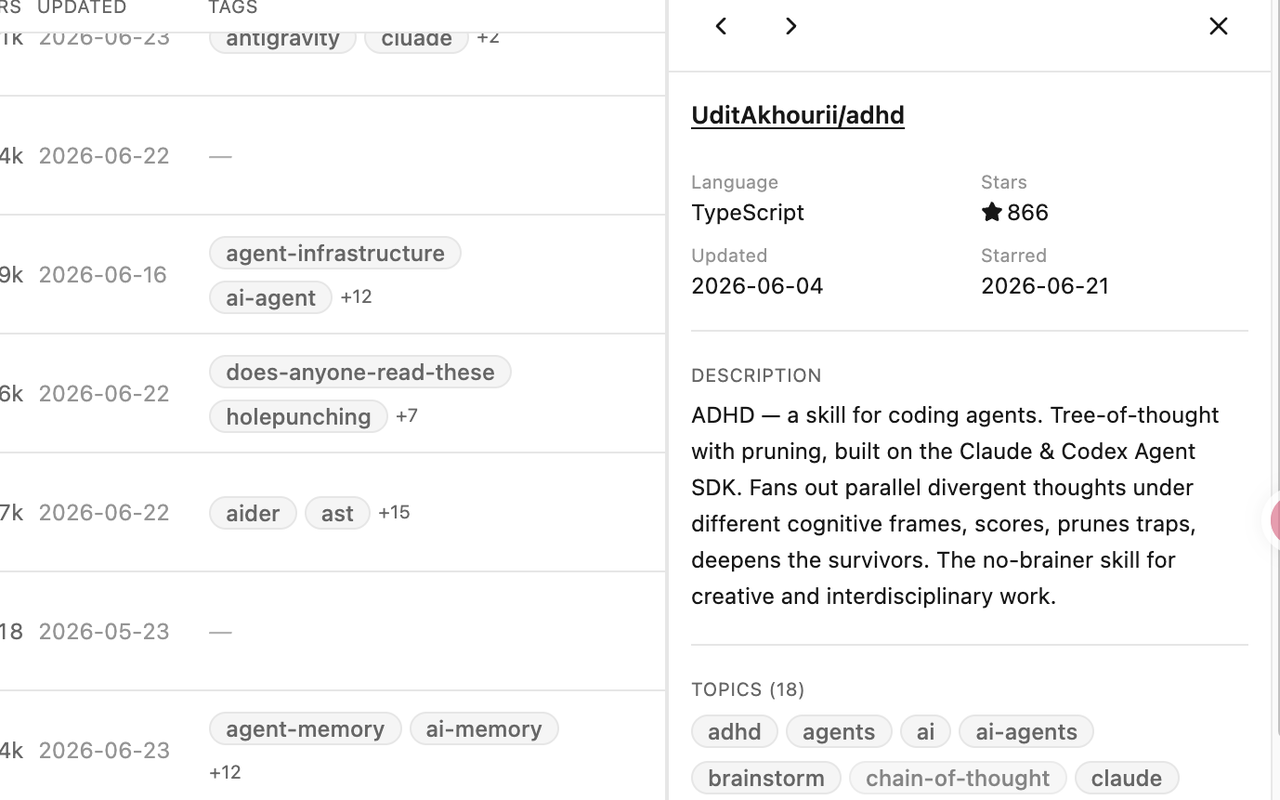
GitHub topics describe the repository
Topics are repository classifications managed by repository administrators. Better Stars can read them, but your personal tags do not edit or replace them.
Read GitHub’s topics documentationPERSONAL TAXONOMY
Use Better Stars to tag GitHub starred repositories with a personal vocabulary that reflects why you saved them. Your tags stay separate from the GitHub topics maintained by repository owners.
THREE DIFFERENT LAYERS
All three can help classify repositories, but they belong to different people and live in different places. Better Stars adds a personal annotation layer without changing repository-owned metadata.
Topics are repository classifications managed by repository administrators. Better Stars can read them, but your personal tags do not edit or replace them.
Read GitHub’s topics documentationLists group starred repositories through GitHub’s own interface. GitHub currently documents Lists as a public preview that is subject to change.
Read GitHub’s Stars and Lists guideAdd terms such as a project purpose, review state, or future use. Tags belong to your Better Stars annotation layer and stay in the current browser by default.
MANUAL TAGS
Create manual tags for the distinctions that matter to you, then add or remove them as your library changes. On a GitHub repository page, Better Stars lets you view and edit the repository’s personal tags through its tag filter, so taxonomy work can happen in the context of the project you are reviewing.
Private notes and favorites sit beside tags as separate forms of context. A tag can group reusable themes; a note can preserve a one-off reason for saving a repository; a favorite can mark an item you want close at hand. None of these actions changes the repository’s GitHub topics.
Create a custom tag for a purpose, workflow, or review state that applies across repositories.
Apply tags while working in the Stars workspace or edit them from the tag filter on a repository page.
Return to the tag filter whenever you want to review the repositories grouped under that term.
A LOCAL STARTING POINT
Better Stars can generate Auto Tags in bulk from the GitHub topics already attached to repositories. The conversion happens locally and gives you an initial vocabulary that you can continue to maintain with manual tags.
TAGGED AND UNTAGGED VIEWS

Use a tag filter to focus on a category, or use the untagged-state filter as an inbox for repositories that still need classification. Tags can be combined with supported language, favorite, archived, and owner filters to narrow the working set without inventing a separate query language.
For the complete retrieval model, see how to search names, descriptions, topics, and notes, then filter by tags.
EDITORIAL ADVICE, NOT AUTOMATION
The following is organizational advice rather than automated Better Stars behavior. A useful taxonomy is one you can apply consistently and revisit without decoding it each time.
Tag by why a repository matters to you instead of copying every topic that its maintainers provide.
Treat untagged repositories as a small classification queue rather than trying to perfect everything at once.
Use a private note for a specific reason, reminder, or comparison that would make a poor reusable tag.
OPTIONAL CUBBY ORGANIZE
Cubby is optional. Its full-library Organize workflow freezes the current scope, analyzes repository evidence without writing tags, and presents the complete proposal for review.
Cubby works through the frozen library scope and records its evidence-backed suggestions.
You choose the rows you want to apply; no tag changes occur during the Review stage.
Writes begin only after Apply, and only for the rows selected during Review.
LOCAL BY DEFAULT
Tags, notes, favorites, and tag metadata are stored in the extension’s local IndexedDB database. The core annotation workflow stays in the current browser unless you start a connected action.
User-started Secret Gist Push and Pull can transport that annotation layer through a secret Gist in your GitHub account. This is not automatic sync, a generic export service, or a copy of all Better Stars state. Repository metadata is rebuilt from GitHub, while Watch, Following, For You, Cubby conversations, and Organize records do not enter the annotation Gist.
If a later rescan reconciles a repository you unstarred, Better Stars retains its existing tags and notes rather than deleting those annotations.
FREQUENTLY ASKED QUESTIONS
No. Repository administrators manage GitHub topics. Better Stars tags are your separate personal annotation layer and do not edit those topics.
Yes. Use the untagged-state filter to create a working view of repositories that still need classification.
Yes. Local bulk Auto Tags derive tags from existing GitHub topics. They are not AI-generated and do not change the source topics.
Tags and related annotations are stored locally in IndexedDB. They reach a Secret Gist only when you start an optional Push or Pull.
Optional Secret Gist Push and Pull can carry the documented annotation layer. The transport is user-started and does not sync all Better Stars state.
A rescan that reconciles an unstarred repository retains its existing tags and notes.
No. Full-library Organize analyzes without tag writes, presents a Review, and applies only selected rows after you choose Apply.
BETTER STARS
Add Better Stars to your GitHub Stars page, create a small personal taxonomy, and return to tagged or untagged repositories when it is time to review them.